STEP-BY-STEP WORKFLOW
Onboarding & Setup Guide
Follow this simple guide to get Lien Scraper fully configured, integrated with Notion, and running.
01
Installation
Temporarily under store review
Lien Scraper is currently being re-reviewed on the Chrome Web Store and isn't installable from there right now. Once it's back live, this page will link straight to it — check back soon or reach out and we'll let you know when it's up.
- Once approved, visit the Lien Scraper Web Store page.
- Click "Add to Chrome" to download and install.
- Click the Puzzle Piece icon in your browser's toolbar and pin Lien Scraper.
- Launch the side panel by clicking the extension icon.
Pending Chrome Web Store review
02
CRM Setup
Create Notion CRM Columns
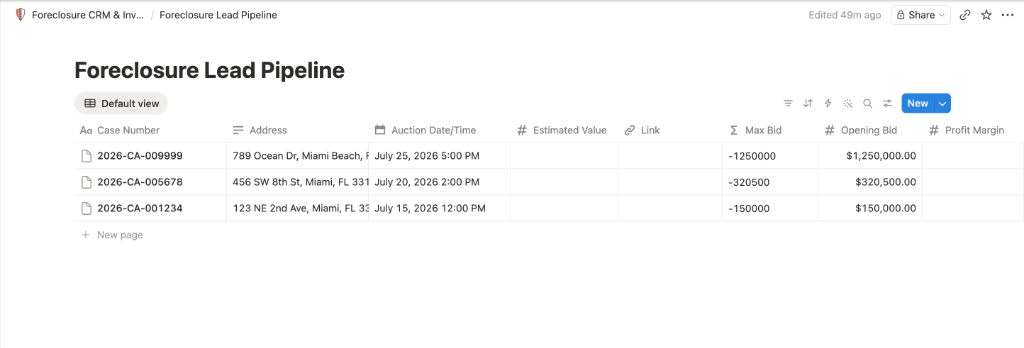
Create a Table Database inside a Notion page and add the following columns (names must match exactly):
- Case Number (Type: Title - default column)
- Address (Type: Text / Rich Text)
- Opening Bid (Type: Number - U.S. Dollar format)
- Auction Date/Time (Type: Date)
- Status (Select options: Active, Sold, Cancelled)
- Link (Type: URL)
Tip: Ensure capitalization is matching.
03
Credentials
Configure Notion Connections
Acquire secure access tokens to authorize data insertion:
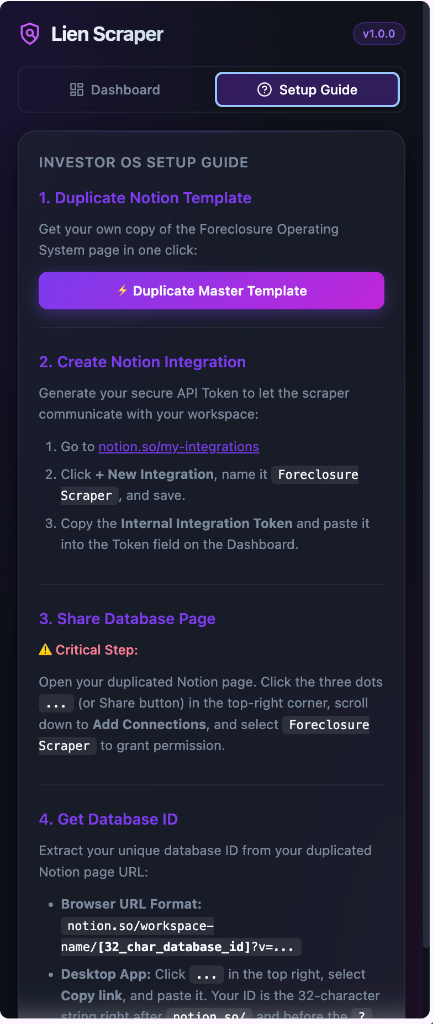
- Go to the connections portal: notion.so/my-integrations
- Create a connection named
Miami Foreclosure Scraper (using + New connection) and copy its Internal Integration Token.
- ⚠️ CRITICAL: Open your Notion Database page. Click the three dots
... menu on top-right, hover over or click "Connections", select "+ Add connection", and search/select your connection.
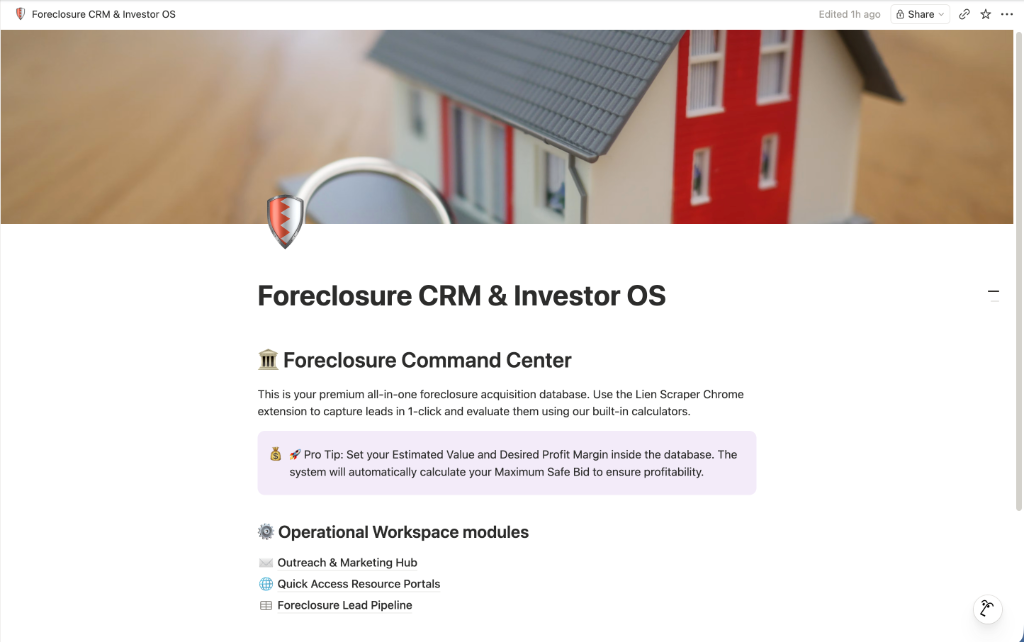
- Open the Foreclosure Lead Pipeline subpage or table database inside your duplicated Notion page. Copy its Database ID from the URL (the 32-character string after the last slash
/ or /p/ and before the ?).
🔒 Token Security: Tokens are stored client-side via chrome.storage.local and are only sent directly to api.notion.com.
04
Scraping Action
Configure & Scrape!
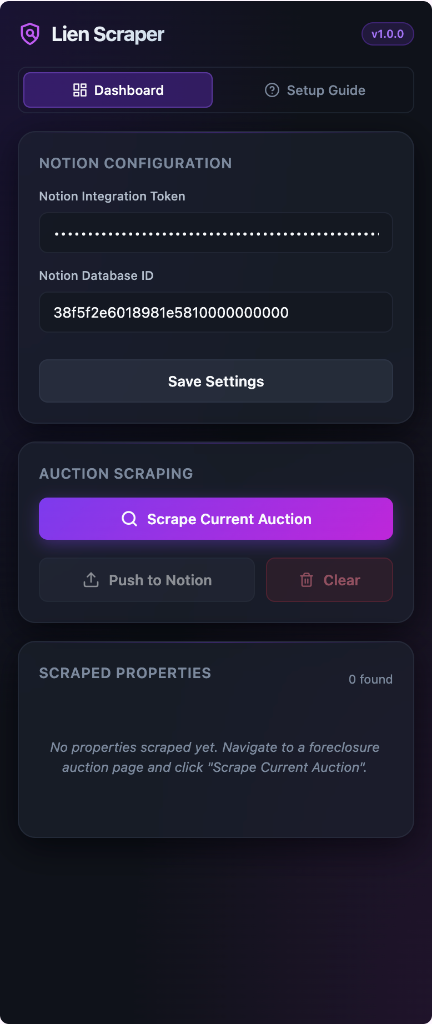
Click your Lien Scraper pinned icon in Chrome to open the Side Panel.
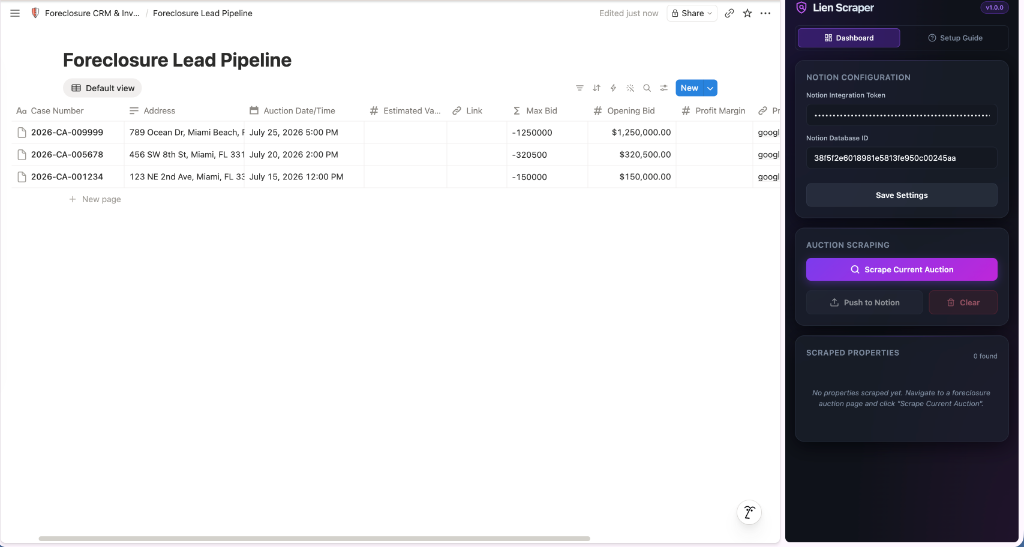
Under **Notion Configuration**, enter your Token and Database ID, then click **Save Settings**.
Navigate to your county's foreclosure calendar page, click **Scrape Current Auction**, check the parsed results list, and click **Push to Notion**!
CRM Synced successfully
In-Extension Onboarding
Lien Scraper includes a built-in step-by-step setup walkthrough right inside the side panel interface!
Privacy Policy
Last Updated: June 30, 2026
This Privacy Policy describes how the Lien Scraper Chrome Extension ("the Extension"), published by Labonni LLC ("we", "us", "our"), handles user data. We are committed to protecting your privacy and ensuring that your interaction with the Extension remains secure and private.
1. No Server-Side Data Collection
The Extension operates as a purely client-side tool. We do not run any remote user databases, and we do not collect, harvest, store, or transmit any personally identifiable information, browsing history, or user activities to our own servers.
2. Secure Local Storage
All settings, configurations, Notion Integration Tokens, and Notion Database IDs entered into the Extension are stored 100% locally on your device via Chrome's secure local storage (chrome.storage.local). This data remains on your browser and is never uploaded to our servers or shared with any third parties.
3. Direct Third-Party API Connections
The Extension makes outbound network connections directly from your browser to third-party API endpoints solely on your command to dispatch scraped property data:
- Notion API (api.notion.com): Transmits scraped property data directly to your private Notion workspace database.
Your interactions with the Notion API are governed by Notion's own privacy policy. Your private API keys are transmitted directly to their endpoints for authentication purposes and are never exposed to us.
4. Data Security
Since your credentials and API keys are stored in your browser's local sandbox, the security of your data depends on the security of your device. We recommend keeping your operating system and web browser up-to-date and using standard security measures to protect your local environment.
5. Data Retention and Deletion
All stored configurations and logs remain on your device until you choose to delete them. You can delete all saved settings and keys at any time by uninstalling the Extension or clearing the Extension's local storage through Chrome's developer tools.
6. Changes to This Policy
We may update this Privacy Policy from time to time. Any updates will be posted on this page and the "Last Updated" date at the top of the policy will be updated accordingly.
7. Contact Us
If you have any questions or concerns regarding this Privacy Policy, please contact us at info@labonni.com.
Terms of Service
Last Updated: June 30, 2026
Welcome to Lien Scraper! These Terms of Service ("Terms") govern your use of the Lien Scraper Chrome Extension ("the Extension") developed by Labonni LLC ("we", "us", "our"). By installing and using the Extension, you agree to be bound by these Terms. If you do not agree, please do not install or use the Extension.
1. Extension Description and Purpose
Lien Scraper is a browser productivity extension designed to help property investors, wholesalers, and realtors scrape public foreclosure property listings locally from county auction websites (such as realforeclose.com) and push them directly to their private Notion workspace databases.
2. API Keys and Credentials
To use the Notion integration features, you must supply your own Notion Integration Token and Database ID. You are solely responsible for:
- Acquiring a valid integration connection and API keys from Notion.
- Sharing your Notion database pages with the custom connection to authorize access.
- Maintaining the confidentiality and security of your credentials locally on your device.
3. Compliance with Third-Party Portal Terms
The Extension operates locally and scrapes data from public auction portals. You are responsible for ensuring that your use of the Extension complies with the terms of service and access policies of the respective county auction portals you visit. We do not accept any liability for any actions taken or limits imposed by third-party websites due to your use of this local data gathering tool.
4. Permitted Use and License
We grant you a personal, non-exclusive, non-transferable, revocable license to install and use the Extension for your own professional real estate operations. You may not reverse-engineer, modify, redistribute, or resell the Extension code or assets.
5. Disclaimer of Warranties
THE EXTENSION IS PROVIDED "AS IS" AND "AS AVAILABLE" WITHOUT WARRANTIES OF ANY KIND, EITHER EXPRESS OR IMPLIED. WE DO NOT WARRANT THAT THE EXTENSION WILL BE UNINTERRUPTED, ERROR-FREE, OR THAT IT WILL ALWAYS MATCH 100% OF THE SECTOR LAYOUT CHANGES OF THIRD-PARTY COUNTY AUCTION PORTALS. WE DISCLAIM ALL WARRANTIES, INCLUDING MERCHANTABILITY AND FITNESS FOR A PARTICULAR PURPOSE.
6. Limitation of Liability
IN NO EVENT SHALL LABONNI LLC BE LIABLE FOR ANY INDIRECT, INCIDENTAL, SPECIAL, CONSEQUENTIAL, OR PUNITIVE DAMAGES, OR ANY LOSS OF PROFITS, DATA, OR USE, ARISING OUT OF OR IN CONNECTION WITH YOUR USE OF THE EXTENSION, EVEN IF WE HAVE BEEN ADVISED OF THE POSSIBILITY OF SUCH DAMAGES.
7. Changes to the Terms
We reserve the right to modify these Terms at any time. Any changes will be posted on this page with an updated "Last Updated" date. Continued use of the Extension after changes are posted constitutes acceptance of the new Terms.
8. Contact Information
If you have any questions about these Terms, please contact us at info@labonni.com.
Refund Policy
Last Updated: June 30, 2026
Thank you for using Lien Scraper! We want you to be completely satisfied with your purchase. Since we offer licensing options for pro access and bundles, this Refund Policy outlines our guidelines for refunds and order cancellations.
1. 14-Day Money-Back Guarantee
If you are not satisfied with your Lien Scraper license, you are eligible for a full refund within 14 days of your initial purchase date. No questions asked.
To request a refund within the 14-day window, please contact us at info@labonni.com with the following details:
- Your purchase email address.
- Your Stripe or Lemon Squeezy payment transaction ID.
2. Refund Processing
Approved refunds are processed immediately through our payment processors and will automatically be credited back to your original payment method. Depending on your bank or card issuer, the refund will typically appear in your account within 5 to 10 business days.
3. Abuse of the Policy
We reserve the right to refuse refunds to users who abuse our refund policy (for example, repeatedly purchasing and requesting refunds to use the extension for free).
4. Contact Us
If you have any questions or would like to request a refund, please reach out to us at info@labonni.com.